Backing up your data: the 3-2-1 rule and the discipline that goes with it
Everyone knows they should back up their data. Plenty of people think they do. And the day a drive fails, they often discover that the last copy is several years old, or that it was on the same drive. The 3-2-1 backup rule is a simple rule that avoids these nasty surprises, as long as you apply it with a little discipline.
The 3-2-1 backup rule in one sentence
Keep 3 copies of your data, on 2 different media, with 1 away from home.
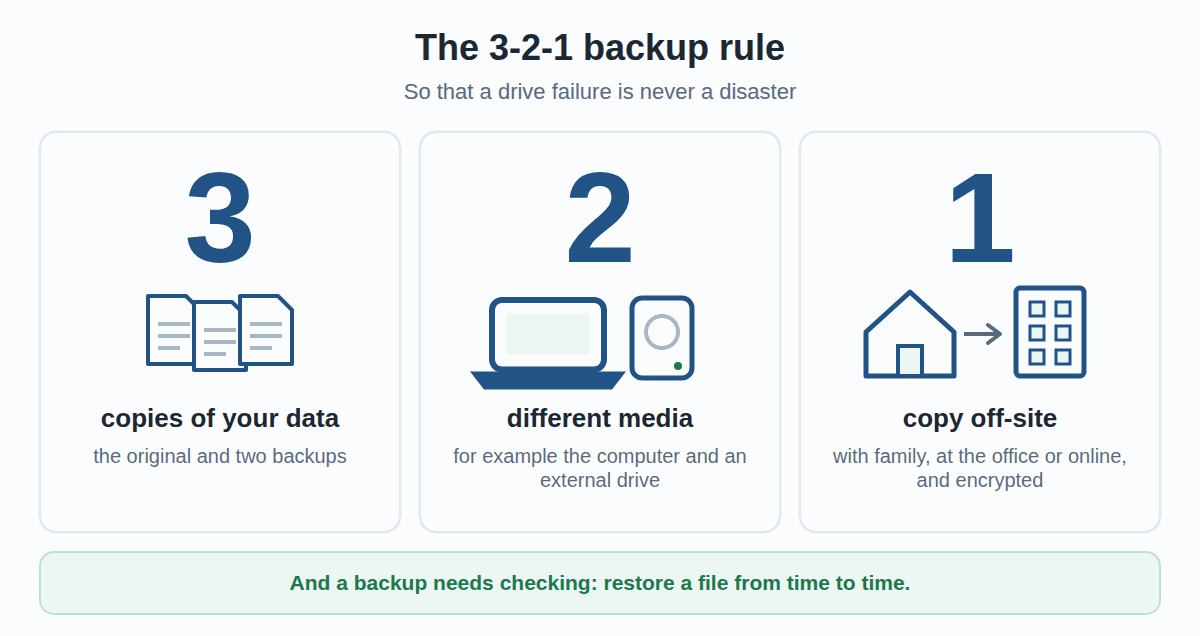
- 3 copies: the original and two backups. A single copy is not enough, because it can fail on the very day you need it.
- 2 different media: for example the computer and an external drive, classic or SSD (see our SSD vs HDD comparison, in French). Two folders on the same drive only count as one.
- 1 copy elsewhere: with family or friends, at the office or in online storage. A fire, water damage or a burglary takes everything that is in the same place.
You may also come across “3-2-1-1-0”: one copy that is offline or cannot be modified, and zero errors when you check. It is the same idea taken all the way, mostly useful for businesses.
What is not a backup
Many data losses happen to people who thought they were protected. The most common traps:
- Moving your files to an external drive. If you then delete them from the computer, you have moved them, not backed them up: there is still only one copy.
- A “Backup” folder on the same drive. The day the drive fails, the original and the copy disappear together.
- Online sync on its own. A file deleted or encrypted by a virus on the computer is deleted or encrypted online too, a few moments later. Some services keep older versions, others do not: check.
- Two mirrored drives (RAID) in a NAS. They protect against one drive failing, not against a mistake, a theft or a virus: whatever you delete is deleted on both.
- A USB stick forgotten in a drawer. It is out of date, nobody has ever read it back, and nothing guarantees it can still be read.
The three copies, in practice
At home
Copy 1: your computer. Copy 2: an external hard drive, plugged in for the backup and then unplugged. Copy 3: a second drive, kept with family or friends and swapped from time to time, or online storage. For family photos and paperwork, this is often enough.
In a small business
The principle is the same, with more rigour: an automatic backup every day, for example to a NAS, a copy that leaves the premises (drives swapped in turn, or an encrypted online backup), and one person in charge of checking that everything works. Accounts and customer documents in particular must be restorable quickly.
Discipline: what makes sure a backup exists on the day of the failure
The 3-2-1 rule says where to keep the copies. It says nothing about what makes most backups fail: forgetting. A few habits change everything.
- Automate. A backup that depends on your memory will end up not being done. Windows (File History) and the Mac (Time Machine) can back up to an external drive on their own.
- Set a rhythm. Every evening for work, every week or every month at home: what matters is that it is regular, and written down somewhere.
- Unplug afterwards. A backup drive that stays plugged in can be encrypted by a virus at the same time as the computer, or fried by the same power surge.
- Keep several versions. With a single copy that is always replaced by the latest one, a mistake or a damaged file overwrites the good version. With a history, you can go back.
- Check by restoring. A backup you have never read back is a backup you do not know works. From time to time, reopen a file from the backup, on another computer if possible.
- Encrypt what leaves. The copy that leaves the home or the office must be encrypted: lost or stolen, it must give nothing away.
- Renew the media. A backup drive ages too. If it becomes slow, noisy or shows errors, replace it before it fails.
What if a NAS took care of it for you?
Not disciplined enough to do your backups by hand? Don’t worry, neither are we. That is why, at IAV, a NAS and backup software take care of it on their own, without us having to think about it.
A NAS is a small box that holds one or more drives and plugs into the home or office network. Computers back up to it automatically, without anyone having to plug anything in. But a NAS sitting in the house is only one of the three copies of the 3-2-1 rule: without a copy elsewhere, in another place or in an online service, a theft, a fire or water damage takes everything.
IAV can install and set up a NAS at your home or in your offices, with automatic backups of your computers and the copy off-site. Our service rates are on the prices page, and you can describe your setup to us through the contact form. To equip yourself: see NAS enclosures and see drives for NAS, designed to run around the clock.
Where to start today
- List what you do not want to lose: photos, documents, accounts, emails.
- Plug in an external drive and run a first full backup.
- Turn on automatic backup, then put the date of the next check in your calendar.
- Organise the off-site copy: a second drive with family or friends, or encrypted online storage.
- Next month, restore a random file to check that everything works.
Need help setting up your backup?
A well-tuned backup needs almost no effort, but setting it up takes a bit of method. Describe your situation through the contact form, and we will get back to you.
And if your drive has already stopped responding, read External hard drive not working: is it really dead? first, before you try anything.
Information and liability
This article gives general principles. The right solution depends on your data, your devices and the way you work.
Despite the care taken in writing it, errors or inaccuracies may remain. If in doubt, call on a professional before changing your backups.
IAV S.à r.l. accepts no liability for data loss resulting from choices or actions made solely on the basis of the information in this article.
IAV S.à r.l. - depuis 2008 - iav.lu
As an Amazon Associate, we earn from qualifying purchases.